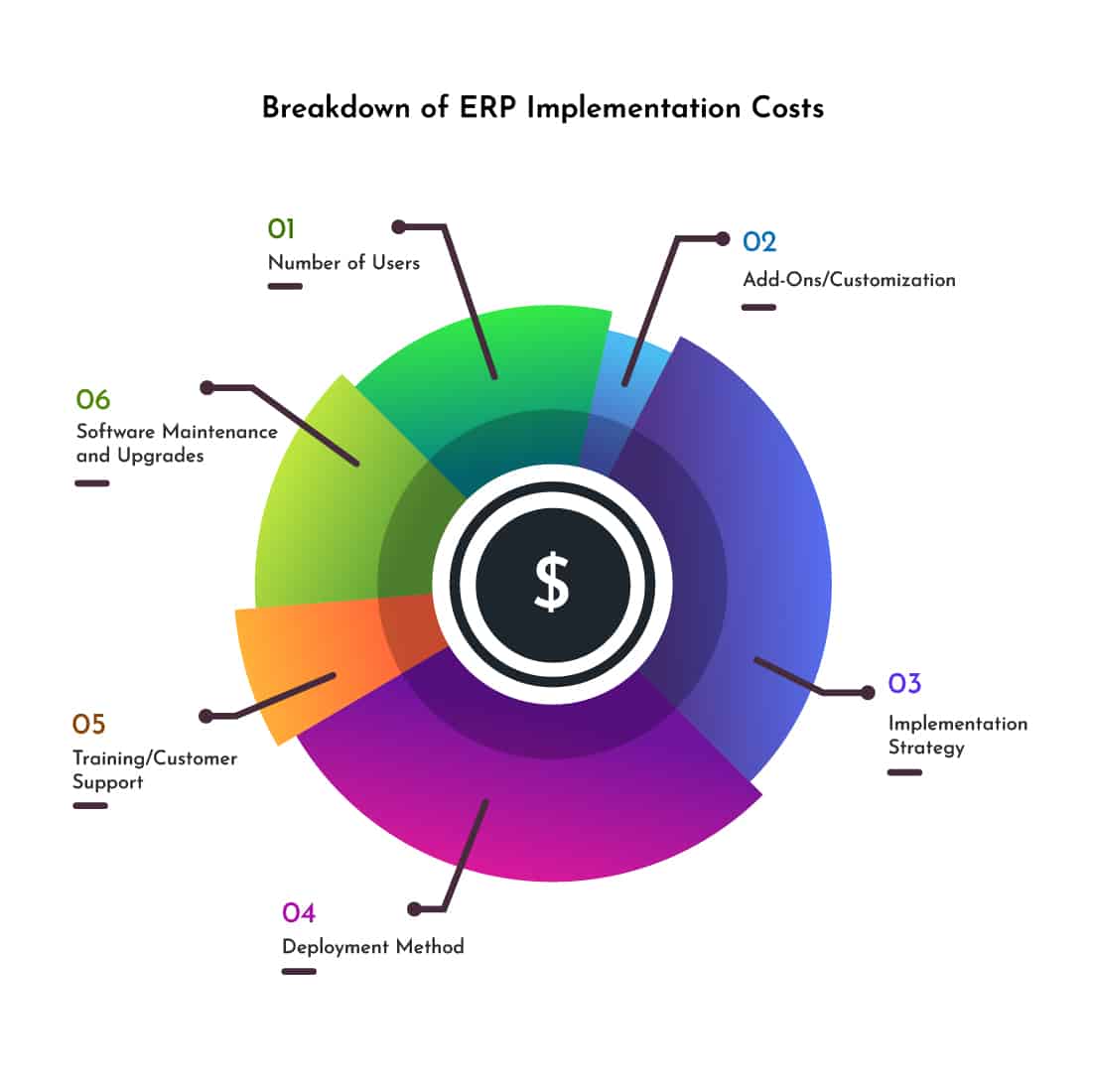
Navigating the Labyrinth: A Comprehensive Breakdown of ERP Implementation Costs
Enterprise Resource Planning (ERP) systems are the backbone of modern businesses, integrating disparate functions like finance, HR, supply chain, and manufacturing into a unified, streamlined platform. The promise of enhanced efficiency, improved data visibility, and strategic decision-making makes ERP an attractive investment. However, the journey to ERP adoption is often perceived as daunting, primarily due to the significant financial outlay involved. Understanding the full spectrum of ERP implementation costs is paramount for effective budgeting, risk mitigation, and ultimately, a successful project.
This article aims to demystify the financial landscape of ERP implementation by providing a comprehensive breakdown of the various cost components. We will explore direct and indirect expenses, discuss factors influencing these costs, shed light on frequently overlooked expenditures, and offer strategies for cost optimization, ensuring businesses embark on their ERP journey with clarity and confidence.
The Major Cost Categories in ERP Implementation
ERP implementation costs are multifaceted, extending far beyond the initial software license. They can be broadly categorized into the following key areas:
1. Software Licensing and Subscription Fees
This is often the most visible cost, representing the price for using the ERP software itself. The structure of these fees varies significantly based on the deployment model:
-
On-Premise ERP:
- Perpetual Licenses: A one-time upfront payment granting indefinite rights to use the software. This is typically accompanied by an annual maintenance fee (15-25% of the license cost) for updates, patches, and basic support.
- Named User Licenses: Cost often depends on the number of users accessing the system. Different user types (e.g., full access, limited access) may have varying price points.
- Module-Based Licensing: Some vendors charge per module (e.g., finance, HR, inventory), allowing businesses to select only the functionalities they need.
- Processor/Server-Based Licensing: Less common for core ERP but sometimes applies to database or specific middleware components.
-
Cloud-Based ERP (Software-as-a-Service – SaaS):
- Subscription Fees: A recurring payment (monthly or annually) that covers software usage, hosting, maintenance, and basic support. This model shifts costs from capital expenditure (CapEx) to operational expenditure (OpEx).
- Per-User, Per-Month Model: The most common pricing model for SaaS, where the cost scales with the number of active users.
- Tiered Pricing: Vendors often offer different tiers (e.g., basic, professional, enterprise) with varying features, storage limits, and support levels.
- Transaction-Based Pricing: Less frequent for core ERP, but some specialized modules might charge based on transaction volume.
The choice between on-premise and cloud significantly impacts upfront costs versus long-term recurring expenses. Cloud ERP generally offers lower initial costs but higher cumulative costs over many years, while on-premise demands a substantial upfront investment but potentially lower long-term running costs (excluding upgrades).
2. Hardware and Infrastructure (Primarily for On-Premise)
For on-premise ERP deployments, substantial investment in hardware and network infrastructure is essential:
- Servers: High-performance servers to host the ERP application and its database.
- Networking Equipment: Routers, switches, firewalls, and network cables to ensure seamless connectivity and security.
- Storage Solutions: SANs (Storage Area Networks) or NAS (Network Attached Storage) for data storage, backup, and disaster recovery.
- Operating Systems & Database Licenses: Costs for Windows Server, Linux distributions, Oracle Database, SQL Server, etc.
- Power and Cooling: Reliable power supply, UPS (Uninterruptible Power Supply), and adequate cooling systems for server rooms.
- Security Hardware: Intrusion detection systems, advanced firewalls, etc.
While cloud ERP eliminates most of these direct hardware costs, businesses still need to ensure robust internal network infrastructure (high-speed internet, reliable Wi-Fi) to access the cloud service effectively.
3. Implementation Services and Consulting
This category often accounts for the largest portion of the total ERP budget, typically ranging from 50% to 70%. It encompasses the professional services required to configure, customize, integrate, and deploy the ERP system.
- Project Management: Services to plan, execute, and monitor the entire ERP project, ensuring it stays on schedule and within budget.
- Business Process Reengineering (BPR): Consulting to analyze existing business processes, identify inefficiencies, and design optimized workflows that align with the ERP system’s capabilities.
- System Configuration and Setup: Tailoring the ERP software to meet specific business requirements, including setting up master data, user roles, security profiles, and operational parameters.
- Customization and Development: If standard ERP functionalities don’t meet unique business needs, custom development might be required for specific modules, reports, or workflows. This is a significant cost driver and should be minimized where possible.
- Data Migration: The complex process of extracting, transforming, cleansing, and loading historical data from legacy systems into the new ERP. This is critical for data integrity and business continuity.
- Integration Services: Developing interfaces to connect the ERP system with other critical business applications (e.g., CRM, e-commerce platforms, BI tools, specialized industry software).
- Testing: Comprehensive testing (unit testing, integration testing, user acceptance testing – UAT) to ensure the system functions as expected and meets business requirements.
- Go-Live Support: On-site or remote assistance during the initial phase of the ERP system’s operation to resolve immediate issues.
Consulting fees can vary widely based on the consultant’s experience, reputation, and geographic location, often charged on an hourly or daily rate.
4. Training and Change Management
Even the most sophisticated ERP system is useless if employees don’t know how to use it or resist its adoption.
- End-User Training: Comprehensive training programs for all employees who will interact with the ERP system, tailored to their specific roles and responsibilities.
- Administrator Training: In-depth training for IT staff and key users who will manage, maintain, and troubleshoot the system post-implementation.
- Training Materials: Development of user manuals, quick reference guides, online tutorials, and other documentation.
- Change Management Consulting: Services to help manage the human side of the transition, addressing employee resistance, fostering adoption, and ensuring smooth cultural integration of the new system. This often includes communication strategies, stakeholder engagement, and user support frameworks.
Underestimating training and change management can severely hinder ERP adoption and ROI.
5. Data Migration
While often bundled under implementation services, data migration deserves its own mention due to its complexity and potential cost. It involves:
- Data Extraction: Pulling data from legacy systems.
- Data Cleansing: Identifying and correcting inaccurate, incomplete, or redundant data. This is often the most time-consuming and labor-intensive part.
- Data Transformation: Reformatting data to fit the new ERP system’s structure.
- Data Mapping: Defining how data fields from old systems map to new ERP fields.
- Data Loading: Importing the cleaned and transformed data into the new ERP.
- Data Validation: Verifying the accuracy and completeness of the migrated data.
Poor data quality can derail an ERP project and lead to ongoing operational issues.
6. Post-Implementation Support and Maintenance
The costs don’t end once the system goes live. Ongoing support ensures the system remains operational, secure, and performs optimally.
- Annual Software Maintenance/Subscription Renewal: For updates, patches, and basic vendor support.
- IT Staffing: Internal IT personnel dedicated to managing, maintaining, and troubleshooting the ERP system. This might include hiring new staff or re-training existing ones.
- Managed Services: Outsourcing ongoing support, monitoring, and maintenance to a third-party provider.
- System Upgrades and Enhancements: Future costs for major version upgrades or implementing new modules/features.
- Security Updates and Patches: Ensuring the system remains protected against evolving cyber threats.
Factors Influencing ERP Implementation Costs
The total cost of an ERP implementation is highly variable, influenced by several key factors:
- Company Size and Complexity: Larger enterprises with more employees, locations, departments, and complex global operations will naturally incur higher costs than small to medium-sized businesses (SMBs).
- Industry Specificity: Industries with unique regulatory requirements or specialized processes (e.g., pharmaceuticals, aerospace, highly regulated manufacturing) may require more extensive customization or specific industry modules, increasing costs.
- Scope of Implementation: The number of modules being implemented (e.g., finance only vs. finance, HR, SCM, CRM, manufacturing) directly impacts complexity and cost. A phased approach can help manage budget.
- Deployment Model: As discussed, on-premise requires significant CapEx for hardware, while cloud ERP shifts to OpEx.
- Level of Customization: Extensive customization is a major cost driver. It increases implementation time, complexity, testing efforts, and future upgrade challenges. Sticking closer to out-of-the-box functionality is almost always more cost-effective.
- Data Volume and Quality: Large volumes of dirty or inconsistent data will significantly increase data migration efforts and costs.
- Vendor Choice: Tier 1 ERP vendors (e.g., SAP, Oracle) are generally more expensive than mid-market solutions (e.g., Microsoft Dynamics 365, NetSuite, Infor) or niche providers.
- Consulting Partner Expertise: Highly experienced and reputable consulting firms often charge higher rates, but their expertise can lead to a smoother, faster, and ultimately more cost-effective implementation.
- Internal Team Capability: The strength and availability of the internal project team (IT, functional leads, project managers) can influence the reliance on external consultants.
Hidden and Overlooked Costs
Beyond the obvious, several hidden costs often catch businesses by surprise, inflating the overall budget:
- Downtime and Productivity Loss: During cutover, initial learning curves, and system adjustments, employee productivity may temporarily decrease, leading to revenue loss or increased operational costs.
- Data Cleansing & Preparation: Often severely underestimated, the effort required to clean, standardize, and prepare legacy data can consume significant internal resources and time.
- Temporary Staffing: Businesses may need to hire temporary staff to backfill roles for employees dedicated to the ERP project or to manage operations during the transition.
- Hardware Upgrades (even for Cloud): While core servers are in the cloud, users might need new workstations, monitors, or network bandwidth upgrades to effectively use the new system.
- Integration with Legacy Systems: If some legacy systems cannot be fully replaced, maintaining and integrating them with the new ERP can incur ongoing costs.
- Security and Compliance: Specific configurations, audits, and ongoing efforts to ensure the ERP system meets industry regulations and data privacy laws.
- Opportunity Costs: Resources (time, money, personnel) diverted from other strategic initiatives to focus on the ERP project.
- Contingency Buffer: Unforeseen issues, scope creep, or unexpected technical challenges are common. A contingency budget (typically 10-20% of the total project cost) is crucial.
- Travel and Expenses: For consultants, internal teams traveling between sites, and training sessions.
- Decommissioning Legacy Systems: Costs associated with shutting down, archiving, and disposing of old systems once the ERP is live.
Strategies for Cost Optimization
While ERP implementation is a significant investment, businesses can employ several strategies to manage and optimize costs:
- Define a Clear Scope: Thoroughly define project objectives, requirements, and scope upfront. Avoid "scope creep" by having a robust change control process.
- Minimize Customization: Prioritize "fit-to-standard" over extensive customization. Embrace best practices embedded in the ERP whenever possible. Customizations add complexity, cost, and make future upgrades more challenging.
- Phased Implementation: Instead of a "big bang" approach, consider a phased rollout (e.g., by module, department, or location). This can help manage cash flow, reduce risk, and allow for lessons learned.
- Leverage Internal Resources: Utilize skilled internal staff for project management, data migration, and testing to reduce reliance on expensive external consultants.
- Negotiate Effectively: Don’t hesitate to negotiate software licenses, subscription fees, and consulting service rates. Bundle services where possible.
- Thorough Vendor and Partner Selection: Conduct extensive due diligence when selecting an ERP vendor and implementation partner. Choose partners with proven industry experience and a strong track record.
- Invest in Change Management: Proactive and robust change management can mitigate resistance, accelerate user adoption, and reduce productivity losses, ultimately saving costs in the long run.
- Prioritize Data Cleansing Early: Start data cleansing and preparation well before the project formally begins. Clean data reduces migration time and avoids post-implementation headaches.
- Cloud vs. On-Premise Analysis: Carefully evaluate the total cost of ownership (TCO) for both cloud and on-premise solutions over a 5-10 year horizon to determine the most financially viable option.
- Build a Strong Internal Team: Empower a dedicated internal project team with the authority and resources needed to drive the project forward, minimizing delays and external consultant hours.
Conclusion: ERP as a Strategic Investment
The decision to implement an ERP system is not merely an IT project; it’s a strategic business transformation. While the associated costs can be substantial and complex, a thorough understanding of the cost breakdown is the first step towards a successful and financially sound implementation. By meticulously planning, budgeting for both direct and indirect expenses, anticipating hidden costs, and actively employing cost optimization strategies, businesses can navigate the financial labyrinth of ERP implementation.
Ultimately, the goal is not to choose the cheapest ERP system or implementation, but to invest wisely in a solution that delivers measurable long-term value, drives operational excellence, and provides a robust foundation for future growth. With diligent preparation and a clear financial roadmap, an ERP system can indeed become the powerful engine that propels a business forward.